Zabbix6.2这些新特性太棒了,手把书教你在Linux部署Zabbix6.2,速度收藏!

Zabbix6.2这些新特性太棒了,手把书教你在Linux部署Zabbix6.2,速度收藏!

网络技术联盟站
发布于 2023-03-01 20:59:01
发布于 2023-03-01 20:59:01
之前给大家带来了Zabbix部署教程:
这篇教程是基于Zabbix 5.0的,但是我们访问Zabbix官网https://www.zabbix.com/看到Zabbix最新版本是6.2:
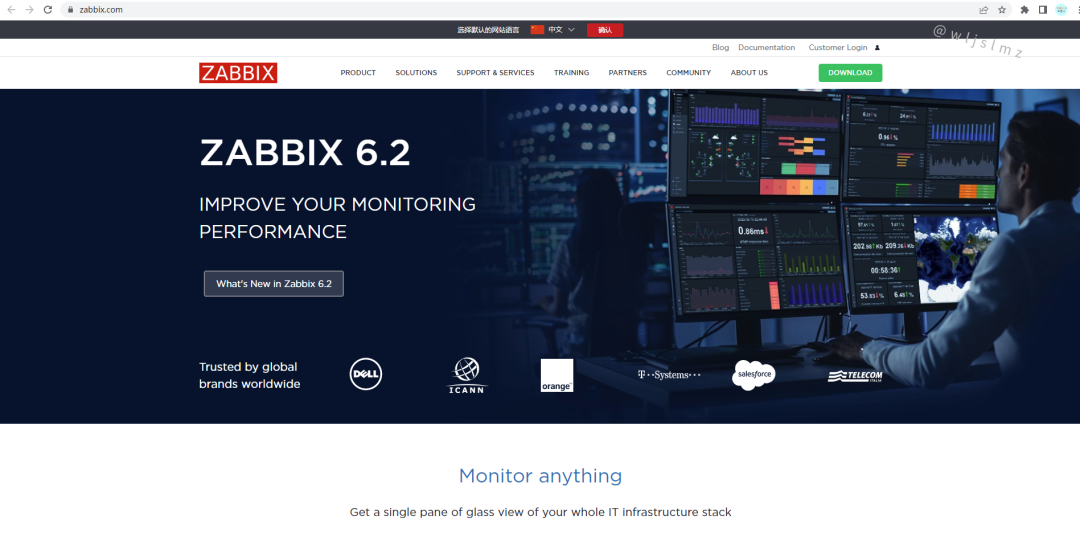
所以本文的宗旨就是介绍一下Zabbix6.2新特性,以及如何部署Zabbix6.2。
一、Zabbix6.2介绍
1.1 Zabbix6.2官网
Zabbix是一个成熟、易用的企业级开源监控解决方案,适用于百万级指标的网络监控和应用监控。
官网地址在文章开头说过了,下面是中文版的:
https://www.zabbix.com/cn/

Zabbix专有词汇:
- zabbix server,服务端,收集数据,写入数据
- zabbix agent,部署在被监控的机器上,是一个进程和zabbix server进行交互,以及负责执行命令
- Host,服务器的概念,指zabbix监控的实体,服务器,交换机等
- Hosts,主机组
- Applications,应用
- Events,事件
- Media,发送通知的通道
- Remote command,远程命令
- Template,模板
- Item,对于某一个指标的监控,称之为Items,如某台服务器的内存使用状况,就是一个item监控项
- Trigger, 触发器,定义报警的逻辑,有正常,异常,未知三个状态
- Action, 当Trigger符合设定值后,zabbix指定的动作, 如发个邮件给运维,说服务器有问题了。
Zabbix程序组件:
- zabbix_server,服务端守护进程
- zabbix_agentd,agent守护进程
- zabbix_proxy,代理服务器
- zabbix_database,存储系统,mysql,pgsql
- zabbix_web,web GUI图形化界面
- zabbix_ get,命令行工具,测试向agent发起数据采集请求
- zabbix_sender,命令行工具,测试向server发送数据
- zabbix_ java_ gateway,java网关
1.2 Zabbix6.2新特性
Zabbix 6.2将又一次提升新用户和资深用户的用户体验,主要通过一系列的UI/UX优化、新监控项和配置选项以及中大型环境部署的性能优化。
1、通过抑制不相关的Zabbix问题减少不必要的噪声
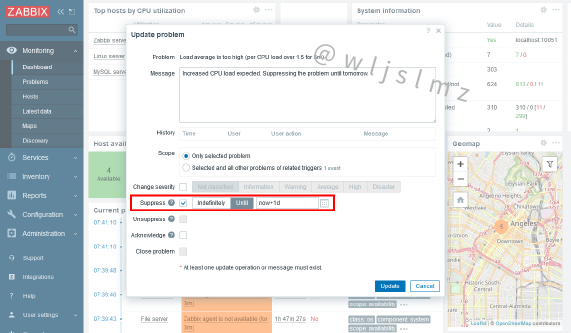
Zabbix管理员现在可以通过抑制不相关的问题来隐藏它们:
- 在特定时间点之前抑制问题
- 无限期抑制问题,直到手动删除
- 与抑制的问题相关的动作操作将暂停,直到问题解除抑制为止
- 在 Problems 页面中选择隐藏或显示抑制的问题
2、在CyberArk vault中存储机密信息,确保安全

除了以前支持的HashiCorp vault之外,Zabbix 6.2还官方支持在CyberArk vault中存储机密信息:
- 可在CyberArk和HashiCorp vault之间选择
- 使用vault证书加密与CyberArk vault的连接
- 保护数据库证书和用户宏的安全
- 可以通过Zabbix API配置和检索Zabbix vault供应商
4、从Zabbix前端同步Zabbix proxy配置
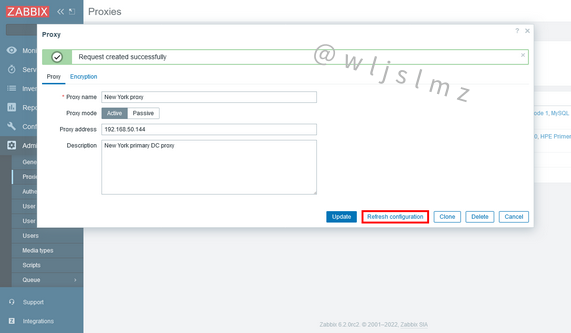
Zabbix proxy管理从未如此简单!现在,proxy配置可以立即从Zabbix前端重新加载:
- 现在可以从Administration - Proxies 页面刷新Zabbix proxy配置
- 可以直接从Zabbix server上的命令行刷新Zabbix proxy配置
- 可以使用Zabbix API刷新Zabbix proxy配置
- 主动proxy和被动proxy都支持集中配置刷新
5、对发现的主机进行更多控制
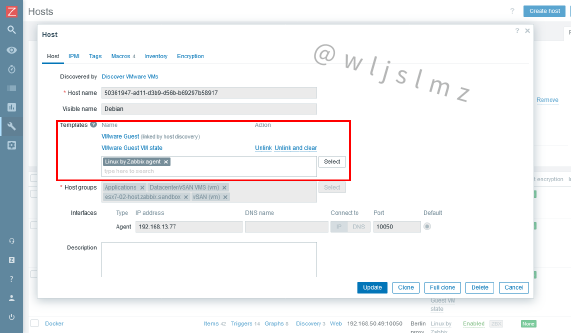
从主机原型中发现的主机现在支持手动编辑模板、标签和用户宏:
- 手动将模板链接到从主机原型中发现的主机
- 能够在从主机原型创建的主机上创建和修改用户宏
- 现在可以在从主机原型创建的主机上创建其他标签
- API host 方法已扩展,可支持模板与主机原型创建的主机之间的手动链接
6、扩展VMware监控
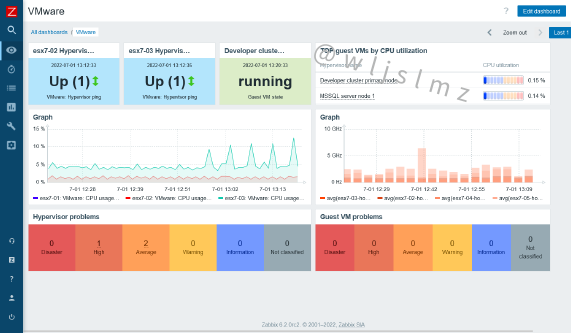
现在可以进一步修改使用Zabbix VMware监控功能创建的主机:
- 手动为发现的VMware主机分配其他模板
- 在发现的VMware主机上创建和修改用户宏
- 在发现的VMware主机上创建其他标签
VMware 监控已扩展到支持许多新监控项和低级别自动发现规则。这可以监控新的指标,例如:
- VMware告警状态
- VMware快照的数量和时间戳
- Hyperviso网络接口指标
- VMware vSphere分布式交换机端口指标
- 数据存储IOPS读/写指标
- 数据存储性能计数器
- VMware guest 状态
- 及其他更多监控项
现在可以根据VMware主机的电源状态对其进行筛选。
7、跟踪 active checks
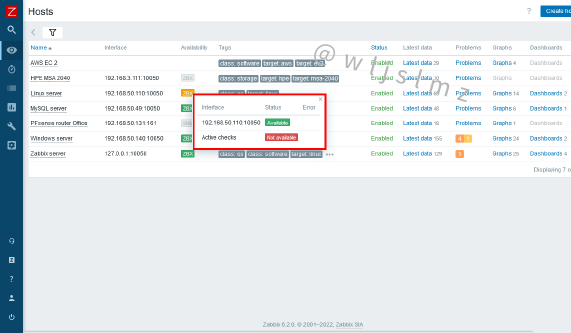
当鼠标悬停在Zabbix agent界面图标上时,现在可以观察到Zabbix active agent检查状态:
- 直接从Zabbix前端跟踪被动和主动 agent 检查的可用性
- agent配置文件中提供了可定制的Zabbix agent心跳周期
- 新的内部监控项可用于active agent检查状态监控
- Zabbix API还可以检索Zabbix active agent检查状态
8、Zabbix性能优化和内部更改
Zabbix server现在只接收最新的配置更改,而不是定期重新加载完整的Zabbix配置数据:
- 配置缓存将支持增量更新
- 新的配置同步逻辑大大提高了大型Zabbix实例的性能
初始监控项检查逻辑已得到优化,新创建的监控项在创建后一分钟内收到其第一个指标,而不是在监控项更新间隔内的随机时间点进行检查:
- 新监控项在创建后一分钟内进行检查
新引入的用户宏缓存减少了配置缓存锁定,因此提高了Zabbix的总体性能:
- 新建用户宏缓存
Zabbix库结构的多项更改:
- 优化Zabbix库结构
- 删除循环Zabbix库依赖项
9、优化execute now的可用性和行为
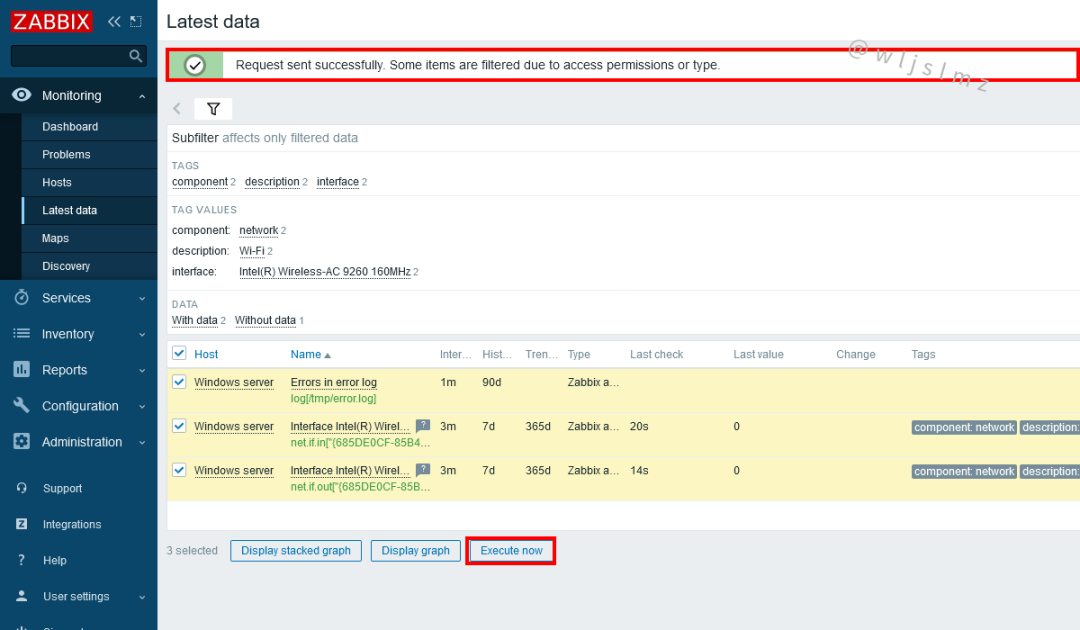
之前用于立即检索指标的execute now(立即执行)按钮,现在可从Latest data (最新数据)页面获得:
- Execute now按钮添加到 Latest data 页面
- 不支持立即执行的监控项将被忽略,而不会显示错误消息
- 如果用户试图在不支持立即执行功能的监控项上使用该功能,将显示警告
- “立即执行”权限已添加到自定义Zabbix角色时可用的权限列表中
10、单独的主机组和模板组
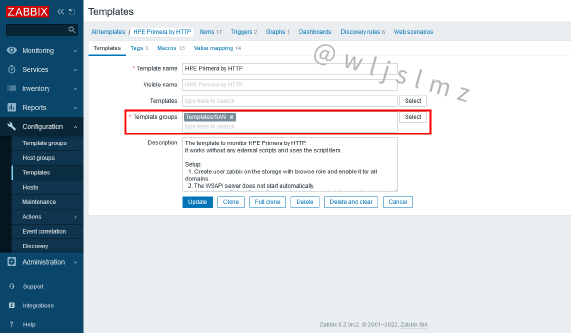
为了简化主机和模板筛选,模板现在分组在模板组中,而不是主机组中:
- 配置菜单下的新建模板组页面
- 在升级过程中,现有模板将移动到模板组
- 完全支持从以前的Zabbix版本导入模板和主机,并将从导入文件中创建适当的组
- 可以为模板组页面分配基于角色的访问权限
- 新的模板组API方法可用于创建、修改和检索模板组
11、支持多个LDAP servers进行用户身份验证
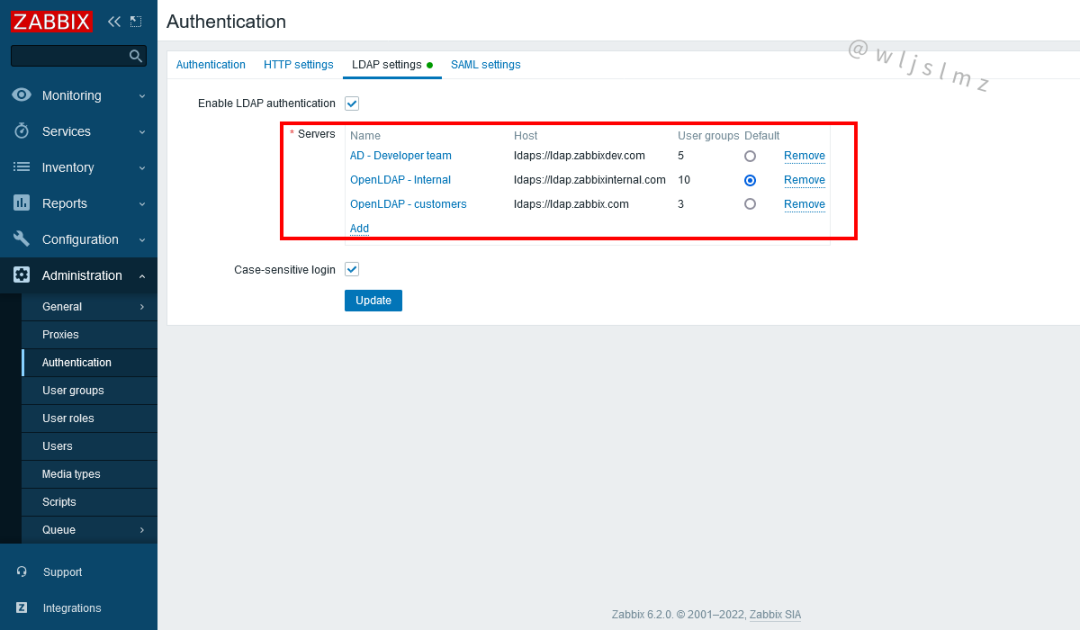
现在可以在Authentication - LDAP settings定义和保存多个LDAP servers:
- 优化安全性并符合公司策略,其中组织单位通过不同的LDAP servers进行身份验证
- 在LDAP servers迁移或更新后,在LDAP servers 之间无缝切换用户身份验证
12、其他模板和集成

Zabbix 6.2为最受欢迎的供应商提供了许多新模板:
- Envoy proxy
- HashiCorp Consul
- AWS EC2 Template
- Proxmox
- CockroachDB
- TrueNAS
- HPE MSA 2060 & 2040
- HPE Primera
- 优化的S.M.A.R.T.监控模板
Zabbix 6.2为GLPI IT资产管理解决方案引入了webhook集成。此webhook可用于将Zabbix中创建的问题转发给GLPi帮助页面。
13、其他新功能和优化
更多改进功能(部分):
- 数字时钟仪表盘小组件
- 仪表盘矢量图的堆叠图选项
- 全局视图默认仪表盘已重新设计
- 对脚本类型监控项和手动脚本支持{INVENTORY.*}宏
- 新的Windows注册表监控项
- 用于监控和发现Windows、Linux和BSD操作系统上的OS进程和进程参数的新监控项
- 删除了对Zabbix数据库MD5 hashes的支持
- 将“文档”按钮添加到所有Zabbix部分
- “文档”按钮能打开相关的Zabbix文档页面
- 针对XSS攻击优化了Zabbix前端保护
1.3 Zabbix6.2重要网址
- Zabbix指导手册:
https://www.zabbix.com/documentation/6.2/en/manual/introduction/whatsnew620 - Zabbix6.2升级指南:
https://www.zabbix.com/documentation/6.2/en/manual/installation/upgrade - 在线公开课:
https://www.zabbix.com/cn/webinars
二、部署Zabbix6.2
系统基于centos8
2.1 配置阿里云源
[root@localhost ~]# cd /etc/yum.repos.d/
[root@localhost yum.repos.d]# rm -rf *
[root@localhost yum.repos.d]# curl -o /etc/yum.repos.d/CentOS-Base.repo https://mirrors.aliyun.com/repo/Centos-vault-8.5.2111.repo
[root@localhost yum.repos.d]# sed -i -e '/mirrors.cloud.aliyuncs.com/d' -e '/mirrors.aliyuncs.com/d' /etc/yum.repos.d/CentOS-Base.repo
[root@localhost yum.repos.d]# yum clean all
[root@localhost yum.repos.d]# yum list all
2.2 安装httpd和mariadb*
注意PHP至少7.4,mariadb至少10.5版本:
[root@localhost ~]# dnf -y install httpd
[root@localhost ~]# dnf -y module install mariadb:10.5
无法安装使用如下命令卸载后重新安装,再安装php:7.4*:
[root@localhost ~]# dnf -y module reset mariadb:10.5
[root@localhost ~]# dnf -y module install mariadb:10.5
[root@localhost ~]# dnf module -y install php:7.4*
查看是否安装成功:
[root@localhost ~]# rpm -qa | grep php
php-cli-7.4.30-1.module_el8.7.0+1190+d11b935a.x86_64
php-common-7.4.30-1.module_el8.7.0+1190+d11b935a.x86_64
php-mbstring-7.4.30-1.module_el8.7.0+1190+d11b935a.x86_64
php-fpm-7.4.30-1.module_el8.7.0+1190+d11b935a.x86_64
php-xml-7.4.30-1.module_el8.7.0+1190+d11b935a.x86_64
php-json-7.4.30-1.module_el8.7.0+1190+d11b935a.x86_64
[root@localhost ~]#
2.3 编译http配置文件
[root@localhost ~]# cd /etc/httpd/conf.d/
[root@localhost conf.d]# find / -name *vhosts.conf
/var/lib/containers/storage/overlay/bfc56aacd784174064eec717da729908e09fc649a3592743aa020d302b09f6ca/diff/usr/local/apache2/conf/extra/httpd-vhosts.conf
/var/lib/containers/storage/overlay/bfc56aacd784174064eec717da729908e09fc649a3592743aa020d302b09f6ca/diff/usr/local/apache2/conf/original/extra/httpd-vhosts.conf
/usr/share/doc/httpd/httpd-vhosts.conf
复制文件并修改:
[root@localhost conf.d]# cp /usr/share/doc/httpd/httpd-vhosts.conf .
[root@localhost conf.d]# ls
autoindex.conf  httpd-vhosts.conf  php.conf  README  userdir.conf  welcome.conf

[root@localhost conf.d]# vim httpd-vhosts.conf
添加内容如下:
<VirtualHost *:80>
    DocumentRoot "/var/www/html/zabbix.example.com"
    ServerName zabbix.example.com
    ProxyRequests Off
    ProxyPassMatch ^/(.*\.php)$ fcgi://127.0.0.1:9000/var/www/html/zabbix.example.com/$1
    <Directory "/var/www/html/zabbix.example.com">
        Options none
        AllowOverride none
        Require all granted
    </Directory>
    ErrorLog "/var/log/httpd/zabbix.example.com-error_log"
    CustomLog "/var/log/httpd/zabbix.example.com-access_log" common
</VirtualHost>
查看是否有IncludeOptional conf.d/*.conf:
[root@localhost conf.d]# cd ..
[root@localhost httpd]# vim conf/httpd.conf
#搜索/DirectoryIndex,添加index.php
# DirectoryIndex: sets the file that Apache will serve if a directory
# is requested.
#
<IfModule dir_module>
    DirectoryIndex index.php index.html
</IfModule>
#//搜索AddType,添加以下内容
AddType application/x-httpd-php .php
AddType application/x-httpd-php-source .phps
创建测试页面:
[root@localhost httpd]# mkdir /var/www/html/zabbix.example.com
[root@localhost httpd]# vim /var/www/html/zabbix.example.com/index.php
<?php
   phpinfo();
?>
开启httpd和mariadb服务:
[root@localhost ~]# systemctl enable --now httpd
[root@localhost ~]# systemctl enable --now mariadb
设置密码:
[root@localhost ~]# mysql
MariaDB [(none)]> set password = password('long123!');
Query OK, 0 rows affected (0.000 sec)
MariaDB [(none)]> quit
Bye
测试是否可以成功登录MySQL:
[root@localhost ~]# mysql -uroot -plong123!
Welcome to the MariaDB monitor.  Commands end with ; or \g.
Your MariaDB connection id is 4
Server version: 10.5.9-MariaDB MariaDB Server
Copyright (c) 2000, 2018, Oracle, MariaDB Corporation Ab and others.
Type 'help;' or '\h' for help. Type '\c' to clear the current input statement.
MariaDB [(none)]> quit
Bye


[root@localhost ~]# systemctl enable --now php-fpm
[root@localhost ~]# systemctl status php-fpm
● php-fpm.service - The PHP FastCGI Process Manager
   Loaded: loaded (/usr/lib/systemd/system/php-fpm.service; enabled; vendor preset: disabl>
   Active: active (running) since Thu 2022-09-01 17:25:53 CST; 8min ago
 Main PID: 7269 (php-fpm)
查看是否有端口没有就进入配置文件编写:
[root@localhost ~]# ss -antl
State     Recv-Q    Send-Q       Local Address:Port        Peer Address:Port    Process
LISTEN    0         80                 0.0.0.0:3306             0.0.0.0:*
LISTEN    0         128                0.0.0.0:22               0.0.0.0:*
LISTEN    0         128                      *:80                     *:*
LISTEN    0         128                   [::]:22                  [::]:*
[root@localhost ~]# vim /etc/php-fpm.d/www.conf
#把如下配置改为
listen = /run/php-fpm/www.sock
#改后
; Note: This value is mandatory.
listen = 0.0.0.0:9000
[root@localhost php-fpm.d]# systemctl restart php-fpm
重新查看端口号,可以看见端口号已经有了:
[root@localhost php-fpm.d]# ss -antl
State     Recv-Q    Send-Q       Local Address:Port        Peer Address:Port    Process
LISTEN    0         128                0.0.0.0:9000             0.0.0.0:*
LISTEN    0         80                 0.0.0.0:3306             0.0.0.0:*
LISTEN    0         128                0.0.0.0:22               0.0.0.0:*
LISTEN    0         128                      *:80                     *:*
LISTEN    0         128                   [::]:22                  [::]:*
[root@localhost php-fpm.d]#
关闭防火墙:
[root@localhost php-fpm.d]# systemctl disable --now firewalld
Removed /etc/systemd/system/multi-user.target.wants/firewalld.service.
Removed /etc/systemd/system/dbus-org.fedoraproject.FirewallD1.service.
[root@localhost php-fpm.d]# setenforce 0
[root@localhost php-fpm.d]# vim /etc/selinux/config
[root@localhost php-fpm.d]# cat /etc/selinux/config | grep SELINUX=
# SELINUX= can take one of these three values:
SELINUX=disabled
2.4 测试服务php页面是否成功
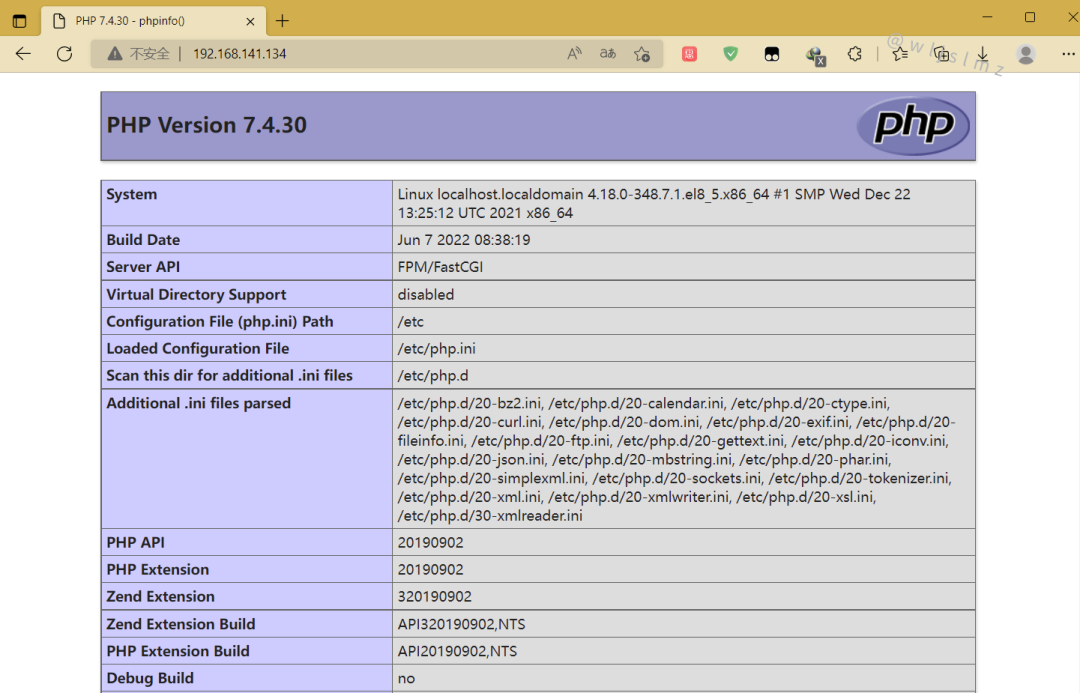
2.5 zabbix服务端安装
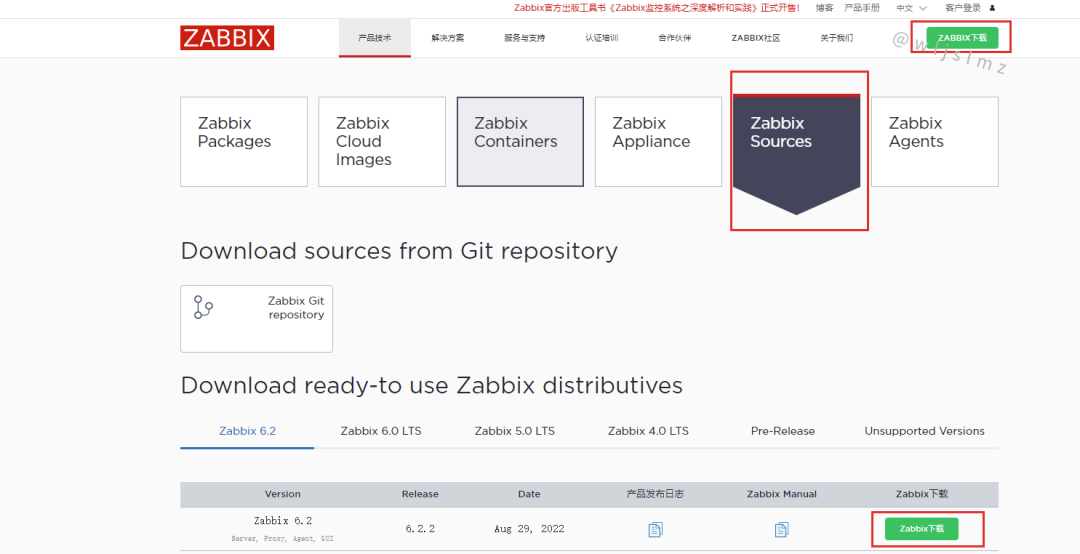
官方网站下载地址:
https://www.zabbix.com/cn/download_sources
[root@localhost conf.d]# cd /usr/src/
[root@localhost src]# wget https://cdn.zabbix.com/zabbix/sources/stable/6.2/zabbix-6.2.2.tar.gz
....
2022-09-01 18:00:30 (5.84 MB/s) - ‘zabbix-6.2.2.tar.gz’ saved [34995538/34995538]
[root@localhost src]# ls
debug  kernels  zabbix-6.2.2.tar.gz
[root@localhost src]#
安装依赖包:
[root@localhost src]# yum -y install net-snmp-devel libevent-devel
安装过程略....
解压安装包并创建用户:
[root@localhost src]# tar xf zabbix-6.2.2.tar.gz
[root@localhost src]# ls
debug  kernels  zabbix-6.2.2  zabbix-6.2.2.tar.gz

[root@localhost src]# useradd -r -d /usr/lib/zabbix -s /sbin/nologin -c "Zabbix Monitoring System" zabbix

[root@localhost src]# mkdir -p /usr/lib/zabbix
[root@localhost src]# chmod 770 /usr/lib/zabbix
[root@localhost src]# chown -R zabbix.zabbix /usr/lib/zabbix
创建数据库:
[root@localhost ~]# mysql -uroot -pzabbix123!
MariaDB [(none)]> create database zabbix character set utf8mb4 collate utf8mb4_bin;
Query OK, 1 row affected (0.000 sec)

MariaDB [(none)]> show databases;
+--------------------+
| Database           |
+--------------------+
| information_schema |
| mysql              |
| performance_schema |
| zabbix             |
+--------------------+
4 rows in set (0.000 sec)

MariaDB [(none)]> create user 'zabbix'@'localhost' identified by 'zabbix123!';
Query OK, 0 rows affected (0.000 sec)

MariaDB [(none)]> grant all privileges on zabbix.* to 'zabbix'@'localhost';
Query OK, 0 rows affected (0.000 sec)

MariaDB [(none)]> SET GLOBAL log_bin_trust_function_creators = 1;
Query OK, 0 rows affected (0.000 sec)
MariaDB [(none)]> flush privileges;
上传表,注意你使用的是什么安装就用什么我这里是用mysql:
[root@localhost src]# cd /usr/src/zabbix-6.2.2/database/mysql
把表导入数据库中:
[root@localhost mysql]# mysql -uroot -plong123! zabbix < schema.sql
[root@localhost mysql]# mysql -uroot -plong123! zabbix < images.sql
[root@localhost mysql]# mysql -uroot -plong123! zabbix < data.sql

[root@localhost ~]# mysql -uroot -plong123!
MariaDB [(none)]> use zabbix
MariaDB [zabbix]> show tables;
....
| widget_field               |
+----------------------------+
176 rows in set (0.003 sec)
#必须176才是正确的
MariaDB [zabbix]> SET GLOBAL log_bin_trust_function_creators = 0;
MariaDB [(none)]> flush privileges;
MariaDB [(none)]> quit
测试是否可以登录:
[root@localhost mysql]# mysql -uzabbix -pzabbix123!
Welcome to the MariaDB monitor.  Commands end with ; or \g.
Your MariaDB connection id is 18
Server version: 10.5.9-MariaDB MariaDB Server
Copyright (c) 2000, 2018, Oracle, MariaDB Corporation Ab and others.
Type 'help;' or '\h' for help. Type '\c' to clear the current input statement.
MariaDB [(none)]> quit

[root@localhost mysql]# cd /usr/src/zabbix-6.2.2
[root@localhost zabbix-6.2.2]# dnf -y install gcc gcc-c++ libxml2-devel libcurl-devel pcre-devel openssl openssl-devel golang-bin make
[root@localhost zabbix-6.2.2]# yum install mysql-devel -y
[root@localhost zabbix-6.2.2]# ./configure --enable-server --enable-agent --with-mysql --with-libcurl --with-libxml2


  Enable web service:    no  #注意这里是否开启
  Enable Java gateway:   no
  LDAP support:          no
  IPv6 support:          no
***********************************************************
*            Now run 'make install'                       *
*                                                         *
*            Thank you for using Zabbix!                  *
*              <http://www.zabbix.com>                    *
***********************************************************
以上是配置安装后有的配置总结,然后服务端就安装好了就,等一下上传网站的文件
[root@localhost zabbix-6.2.2]# make install
...等待,注意需要安装完成才能操作

[root@localhost zabbix-6.2.2]# cd /usr/local/etc/
[root@localhost etc]# vim zabbix_server.conf
#添加数据库的密码
### Option: DBPassword
#       Database password.
#       Comment this line if no password is used.
#
# Mandatory: no
# Default:
# DBPassword=
DBPassword=zabbix123!
开启服务:
[root@localhost etc]# zabbix_server
[root@localhost etc]# zabbix_agentd
[root@localhost etc]# ss -anlt
State     Recv-Q    Send-Q       Local Address:Port        Peer Address:Port    Process
LISTEN    0         128                0.0.0.0:10050            0.0.0.0:*
LISTEN    0         128                0.0.0.0:10051            0.0.0.0:*
LISTEN    0         128                0.0.0.0:9000             0.0.0.0:*
LISTEN    0         128                0.0.0.0:22               0.0.0.0:*
LISTEN    0         80                       *:3306                   *:*
LISTEN    0         128                      *:80                     *:*
LISTEN    0         128                   [::]:22                  [::]:*
[root@localhost etc]#
2.6 zabbix服务端web界面安装与配置
[root@localhost etc]# cd /usr/src/zabbix-6.2.2/
[root@localhost zabbix-6.2.2]# ls
aclocal.m4  compile        config.sub    depcomp     Makefile     missing  ui
AUTHORS     conf           configure     include     Makefile.am  NEWS
bin         config.guess   configure.ac  INSTALL     Makefile.in  README
build       config.log     COPYING       install-sh  man          sass
ChangeLog   config.status  database      m4          misc         src
[root@localhost zabbix-6.2.2]# cp -a ui/* /var/www/html/zabbix.example.com/
cp: overwrite '/var/www/html/zabbix.example.com/index.php'? y
[root@localhost zabbix-6.2.2]#
修改属主:
[root@localhost zabbix-6.2.2]# ll /var/www/
total 0
drwxr-xr-x. 2 root root  6 Nov 12  2021 cgi-bin
drwxr-xr-x. 3 root root 32 Sep  1 22:18 html
[root@localhost zabbix-6.2.2]# chown -R apache.apache /var/www/html/
[root@localhost zabbix-6.2.2]# ll /var/www/
total 0
drwxr-xr-x. 2 root   root    6 Nov 12  2021 cgi-bin
drwxr-xr-x. 3 apache apache 32 Sep  1 22:18 html
[root@localhost zabbix-6.2.2]# ll /var/www/html/
total 4
drwxr-xr-x. 13 apache apache 4096 Sep  1 23:10 zabbix.example.com
[root@localhost zabbix-6.2.2]#
2.7 页面安装前的环境安装
修改/etc/php.ini的配置并重启php-fpm:
[root@localhost ~]# sed -ri 's/(post_max_size =).*/\1 16M/g' /etc/php.ini
[root@localhost ~]# sed -ri 's/(max_execution_time =).*/\1 300/g' /etc/php.ini
[root@localhost ~]# sed -ri 's/(max_input_time =).*/\1 300/g' /etc/php.ini
[root@localhost ~]# sed -i '/;date.timezone/a date.timezone = Asia/Shanghai' /etc/php.ini
[root@localhost ~]# systemctl restart php-fpm
[root@localhost ~]# dnf -y install php-bcmath php-gd php-mysqlnd
中文安装需要的环境:
[root@localhost ~]# dnf -y install glibc-common langpacks-zh_CN.noarch
2.8 web页面安装
选择语言
这里是因为我的系统没有多种语言支持,如果想安装中文需要安装中文安装需要的环境:
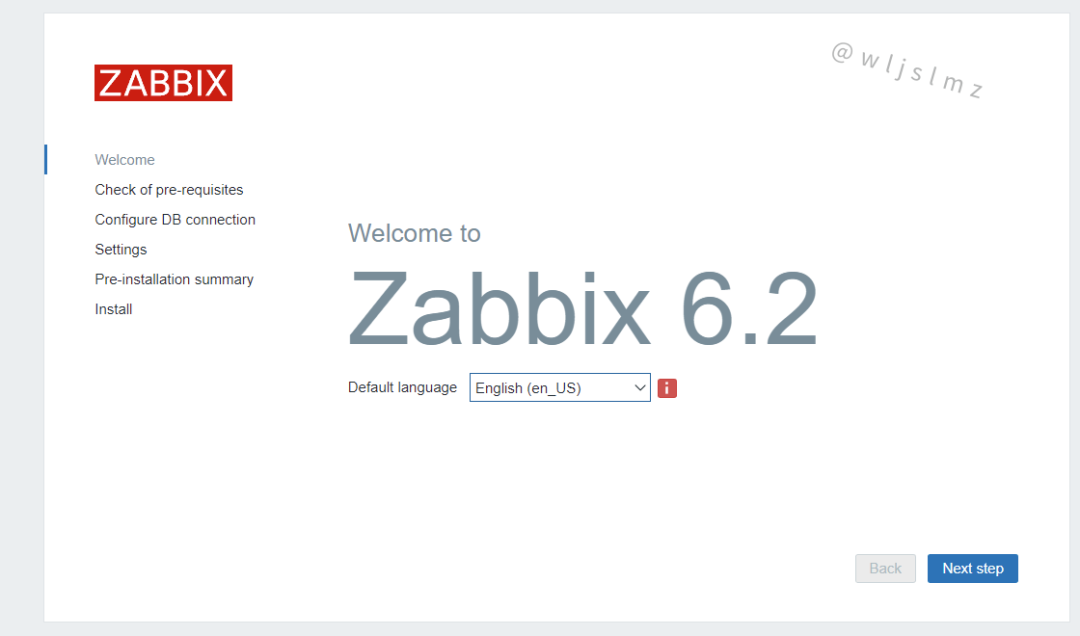
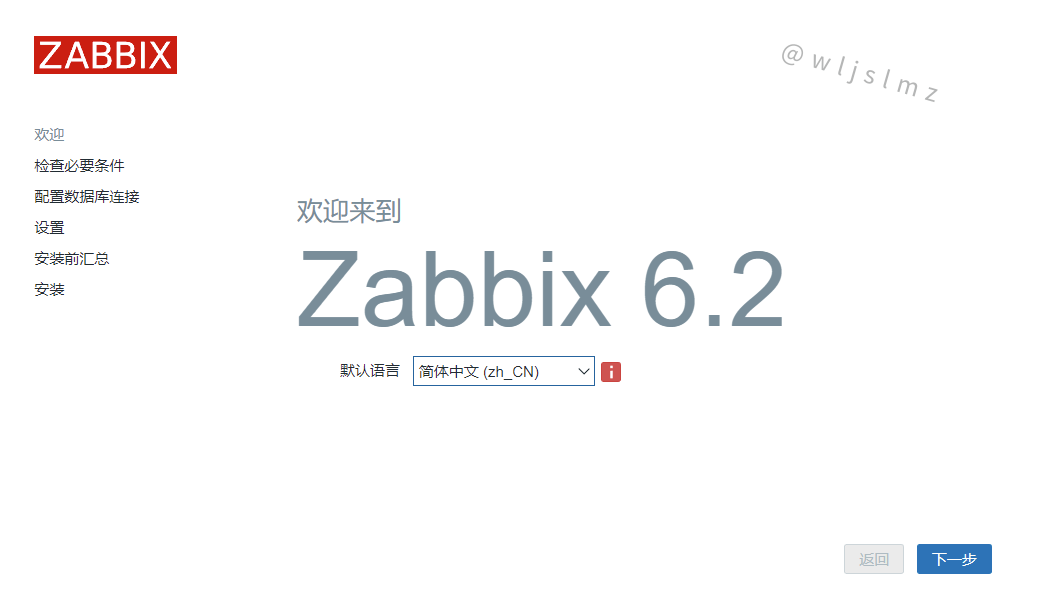
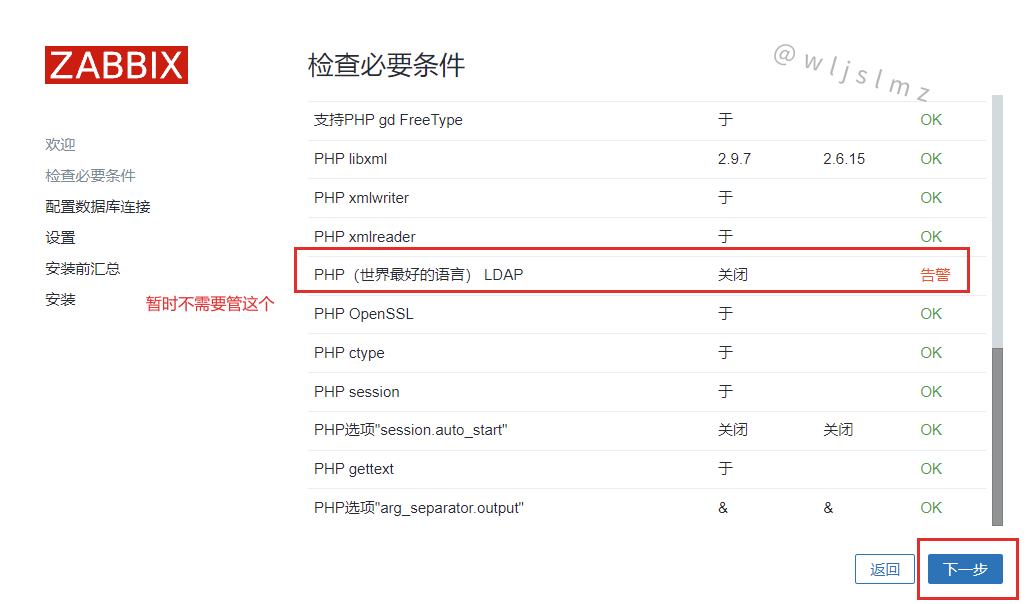
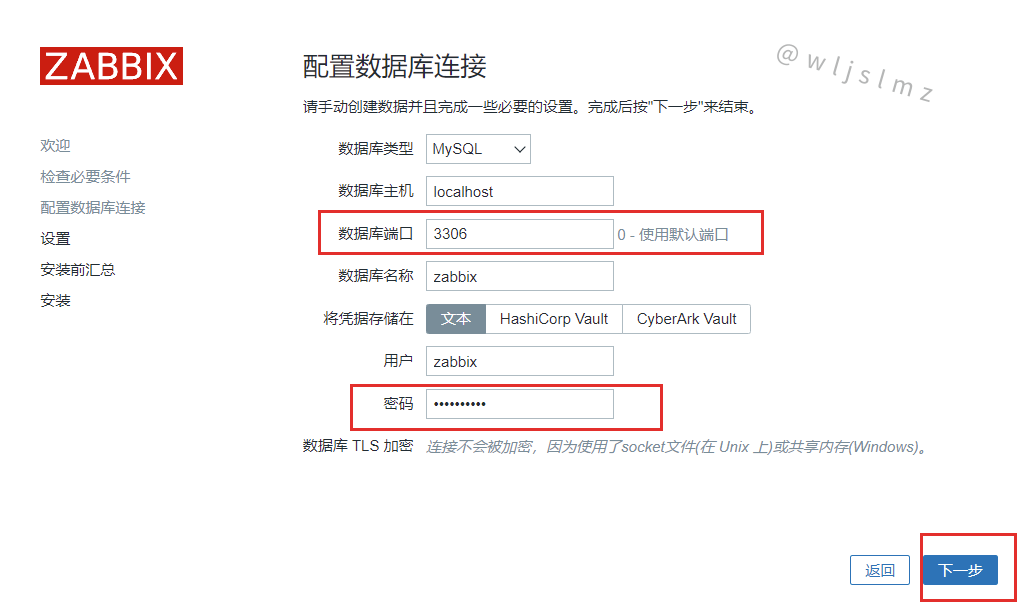
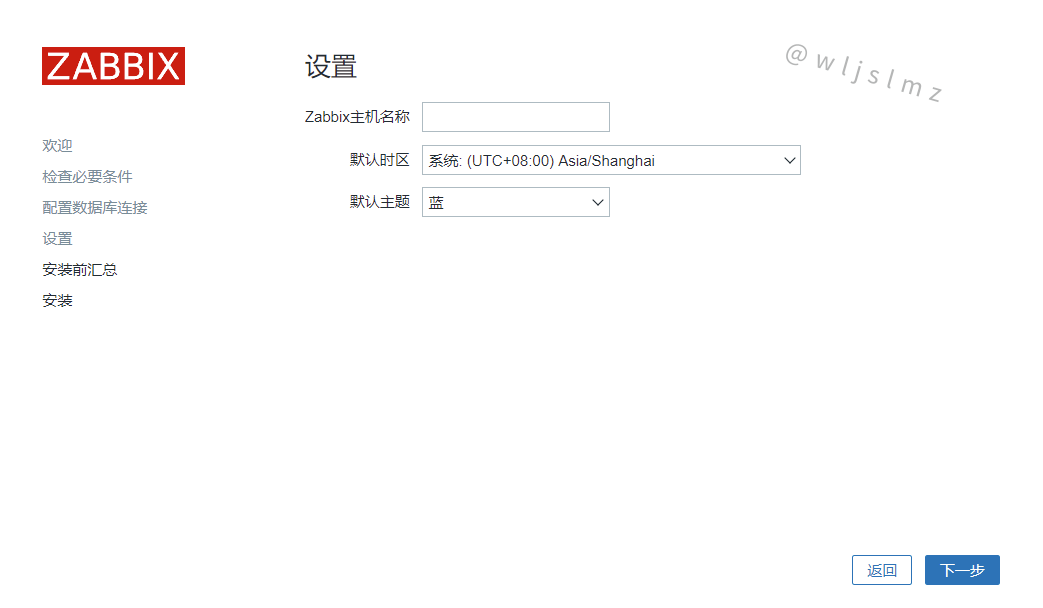
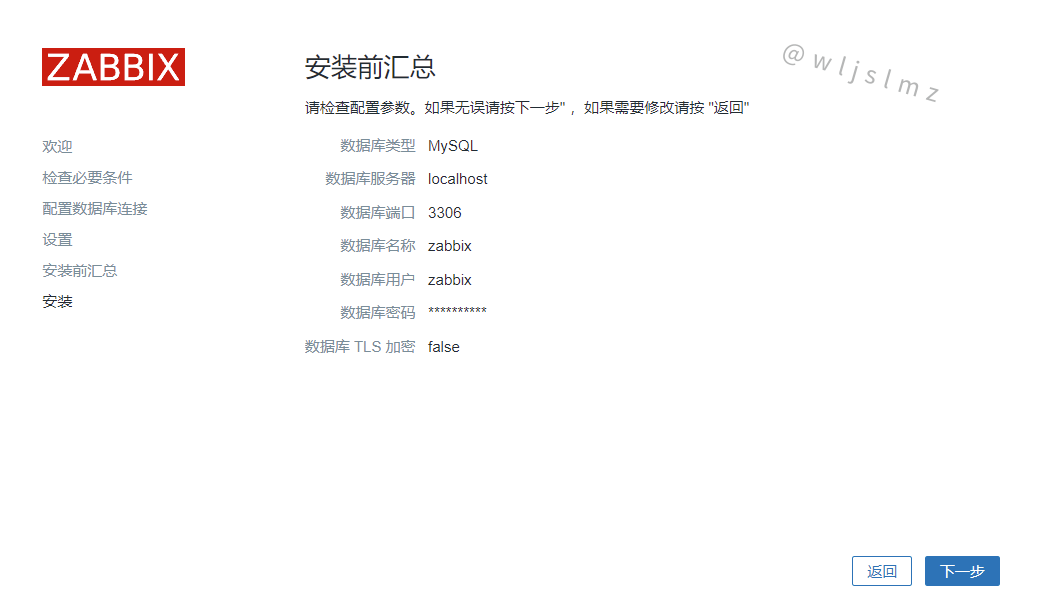
点击【完成】!
2.9 登录
默认的账号名Admin,密码zabbix:
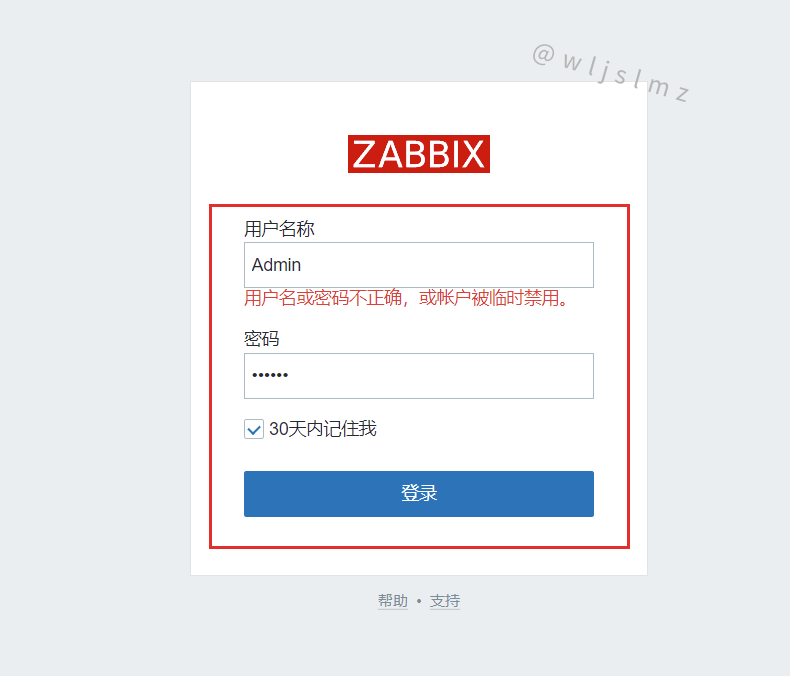
登录成功:
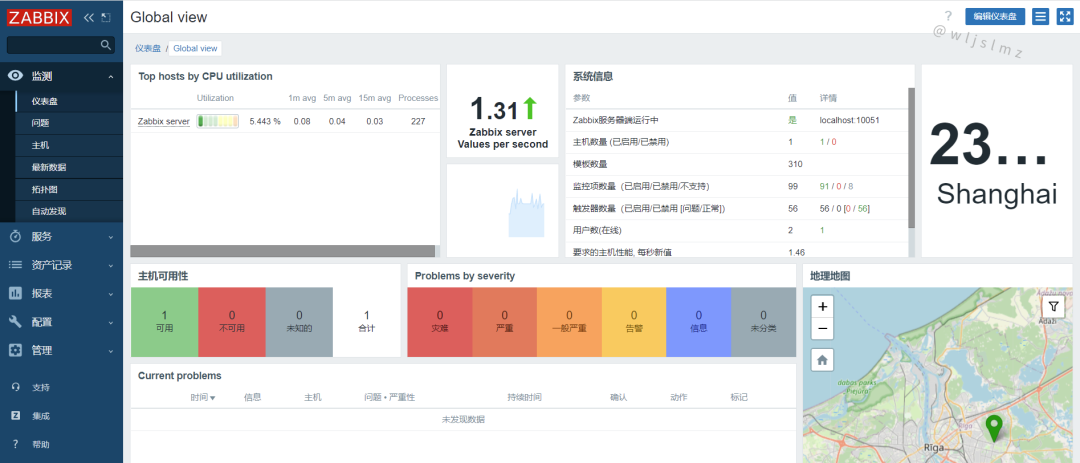
2.10 配置服务开机自启
查看现在开启的端口:
[root@localhost ~]# ss -anlt
State     Recv-Q    Send-Q       Local Address:Port        Peer Address:Port    Process
LISTEN    0         128                0.0.0.0:9000             0.0.0.0:*
LISTEN    0         128                0.0.0.0:22               0.0.0.0:*
LISTEN    0         80                       *:3306                   *:*
LISTEN    0         128                      *:80                     *:*
LISTEN    0         128                   [::]:22                  [::]:*
编写配置文件:
[root@localhost ~]# vim /etc/rc.local
#!/bin/bash  #直接在下面添加然后保存
zabbix_server
zabbix_agentd
...
查看执行的文件然后授予执行权限,然后运行:
[root@localhost ~]# ll /etc/rc.local
lrwxrwxrwx. 1 root root 13 Dec  2  2020 /etc/rc.local -> rc.d/rc.local
[root@localhost ~]# chmod +x /etc/rc.d/rc.local
[root@localhost ~]# ll /etc/rc.d/rc.local
-rwxr-xr-x. 1 root root 502 Sep  4 14:47 /etc/rc.d/rc.local
[root@localhost ~]# source /etc/rc.d/rc.local
查看端口观察服务是否开启:
[root@localhost ~]# ss -anlt
State     Recv-Q    Send-Q       Local Address:Port        Peer Address:Port    Process
LISTEN    0         128                0.0.0.0:10050            0.0.0.0:*
LISTEN    0         128                0.0.0.0:10051            0.0.0.0:*
LISTEN    0         128                0.0.0.0:9000             0.0.0.0:*
LISTEN    0         128                0.0.0.0:22               0.0.0.0:*
LISTEN    0         80                       *:3306                   *:*
LISTEN    0         128                      *:80                     *:*
LISTEN    0         128                   [::]:22                  [::]:*
[root@localhost ~]#
至此Zabbix6.2就部署完毕了。
三、Zabbix主题
Zabbix可以选择主题,这里介绍四个:
3.1 Theme Blue
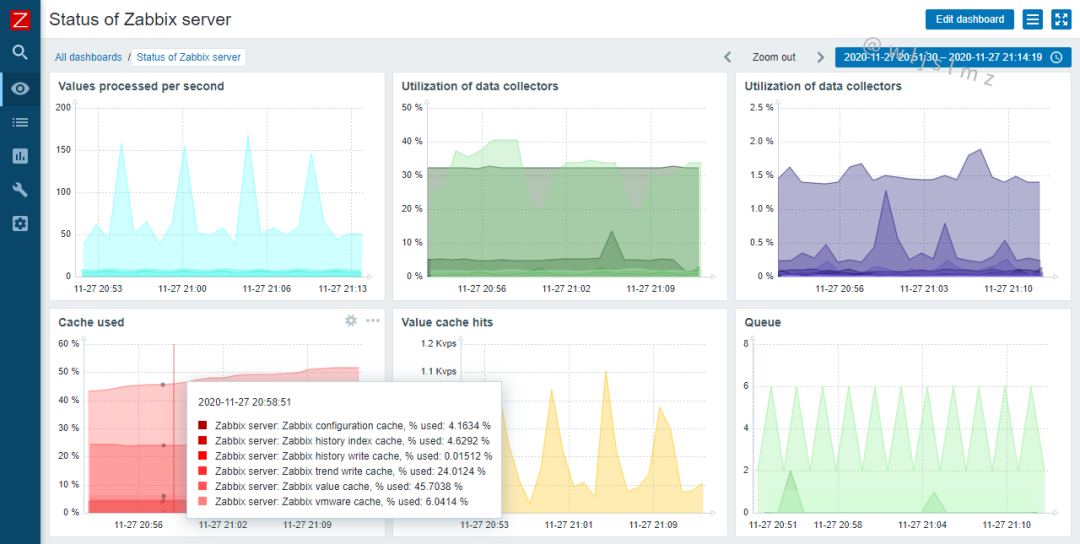
3.2 Theme Dark
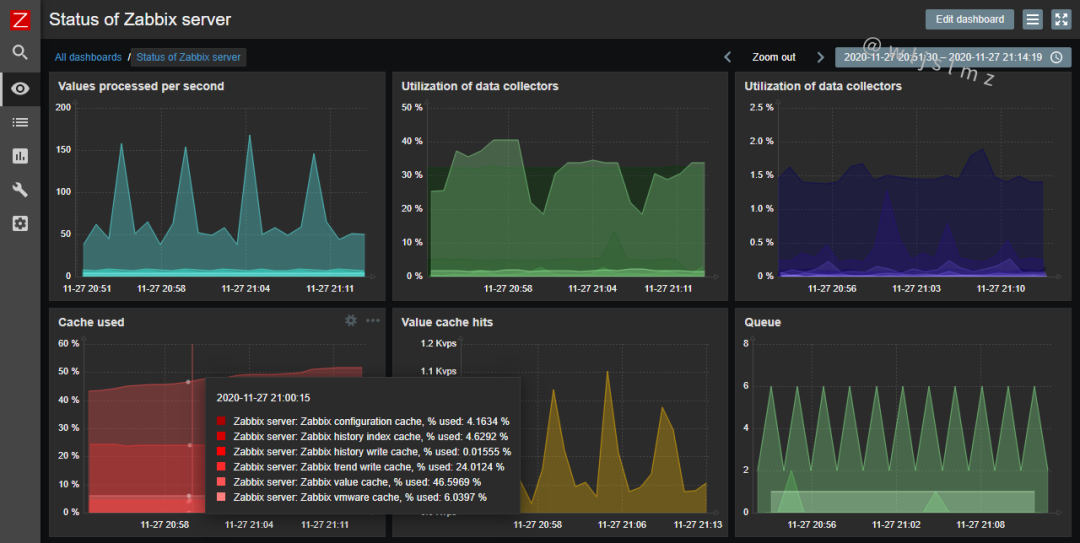
3.3 Theme DC
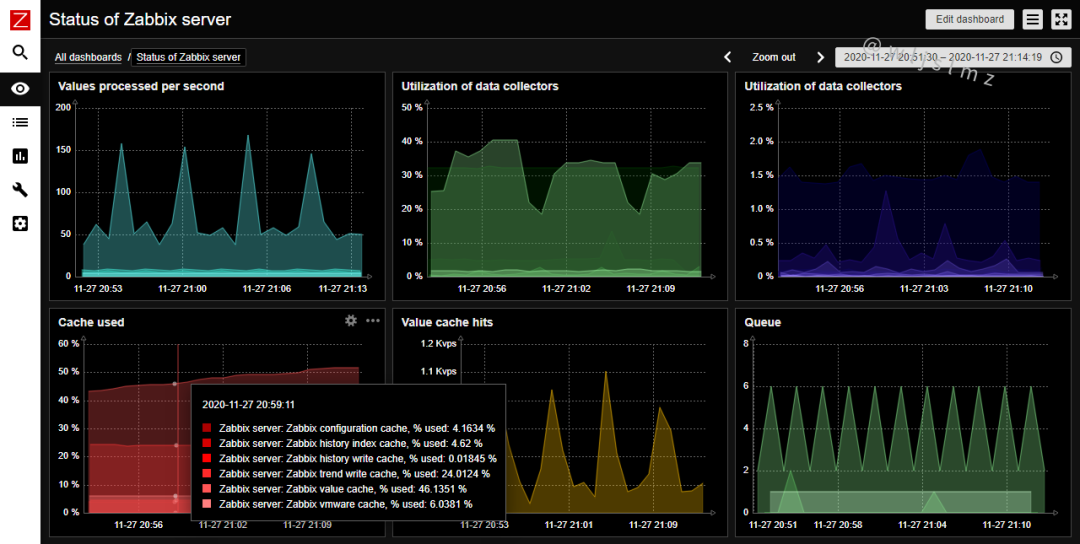
3.4 Theme HC
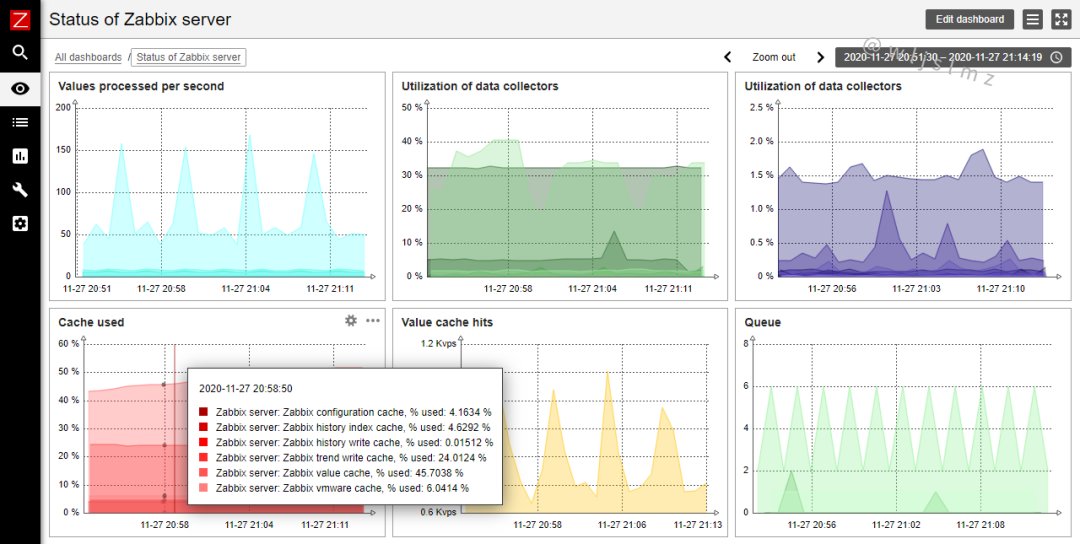
四、总结
本文给大家介绍了Zabbix的概念、Zabbix6.2新特性,以及如何在CentOS8上部署Zabbix6.2,最后还给大家展示了Zabbix的四个常用的主题,希望本文对您有所帮助,感谢阅读!
本文参与 腾讯云自媒体同步曝光计划,分享自微信公众号。
原始发表:2022-12-09,如有侵权请联系 cloudcommunity@tencent.com 删除
目录
腾讯云开发者

Copyright © 2013 - 2026 Tencent Cloud. All Rights Reserved. 腾讯云 版权所有
深圳市腾讯计算机系统有限公司 ICP备案/许可证号:粤B2-20090059  粤公网安备44030502008569号
腾讯云计算(北京)有限责任公司 京ICP证150476号 | 京ICP备11018762号